
Template Library
PFMEA Template
A practical Process Failure Mode and Effects Analysis workbook built for real team use in manufacturing and quality planning. The file supports structured risk review, action assignment, and post-mitigation rescoring.
This template package includes an Excel version, a Google Sheets version, a rating guide, and instructions. It is designed to help teams evaluate process risk using Severity, Occurrence, and Detection ratings, document current controls, assign recommended actions, and verify risk reduction after improvements are made.
Template Preview
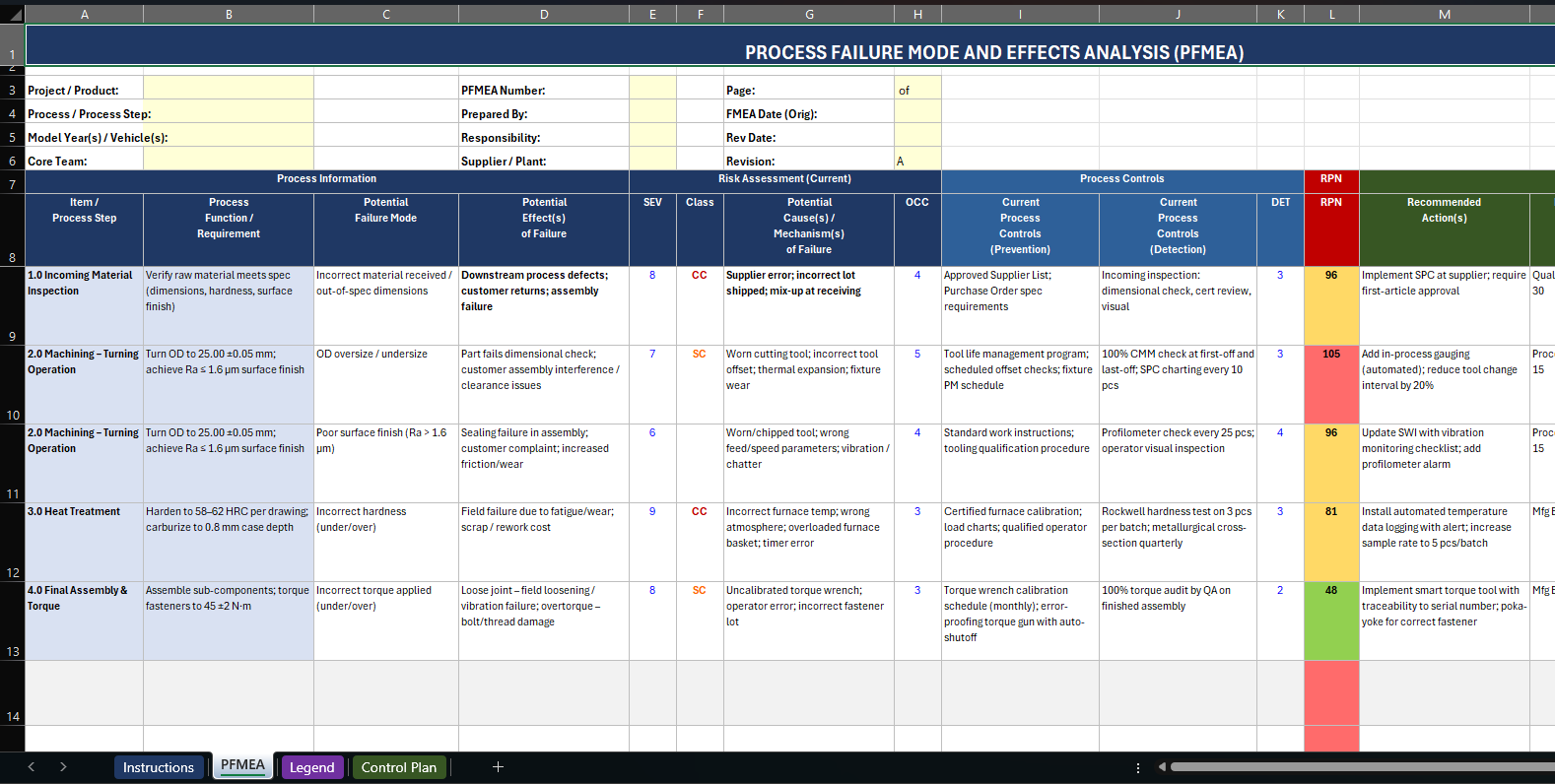
This reference preview shows the PFMEA worksheet structure used in the companion PFMEA and Control Plan package. The standalone PFMEA file follows the same manufacturing risk-review logic: failure modes, controls, actions, and post-action rescoring.
What Is Included
| Sheet | Purpose | What Users Capture |
|---|---|---|
| PFMEA Template | Main working sheet | Process step, process function, failure mode, effect, cause, controls, ratings, actions, ownership, and revised scores |
| Rating Guide | Scoring consistency | Example interpretations for Severity, Occurrence, and Detection ratings |
| Instructions | Quick-start guidance | How to fill out the worksheet, use ratings, and confirm risk reduction after action |
How the Worksheet Is Structured
The workbook starts with header fields for part or product, process or line, prepared by, team, date, revision, and customer or program information. That makes it usable for both local manufacturing risk reviews and customer-facing APQP documentation.
The main PFMEA table is organized around the standard flow:
- Process step and process function
- Potential failure mode
- Potential effects of failure
- Severity rating
- Classification
- Potential causes or mechanisms
- Occurrence rating
- Current prevention controls
- Current detection controls
- Detection rating
- RPN calculation
- Recommended action, owner, target date, and action taken
- Revised Severity, Occurrence, Detection, and revised RPN
Why This Template Works
Formula-Driven RPN
The workbook calculates RPN automatically from Severity, Occurrence, and Detection. That reduces manual error and keeps the team focused on the quality of the ratings and actions rather than spreadsheet math.
Simple Team Setup
The header fields are enough for practical documentation without overcomplicating the form. Teams can quickly identify the product, process, revision, ownership, and review group before beginning the analysis.
Post-Action Rescoring
The revised rating columns force the team to prove risk reduction after mitigation rather than assuming that every corrective action automatically solved the issue.
Instruction and Rating Support
The supporting sheets make the workbook more usable for teams that do not maintain a separate PFMEA handbook. That improves scoring consistency and speeds onboarding.
Best Use Cases
- New process launches and APQP planning
- Control-plan development support
- Process changes, equipment moves, and major engineering changes
- Internal risk reviews after quality escapes or chronic defects
- Supplier development and manufacturing-risk assessment
How to Use the Template Well
- Define the process steps clearly before rating anything. Weak process-step definition leads to weak PFMEA logic.
- Describe failure modes as process failures, not vague problems. Be specific about what can go wrong.
- Write the potential effects from the downstream perspective, including customer, safety, function, and process impact.
- Use the rating guide consistently so teams do not inflate or deflate scores based on opinion.
- Document both prevention controls and detection controls. Many PFMEAs are weak because teams blur those together.
- Assign real owners and target dates for recommended actions. A PFMEA without action ownership is only a risk register.
- Re-score after actions are complete and review whether the revised RPN reflects meaningful risk reduction.
Excel vs. Google Sheets
The Excel workbook is best if your team uses local file control, formal customer submission packages, or internal shared drives. The Google Sheets version is useful for teams that prefer browser-based collaboration, quick sharing, and lighter-weight access.
The content structure remains aligned across both versions, so teams can choose the format that fits their workflow without losing the PFMEA logic.
Who Should Use This Template
- Process and manufacturing engineers building launch or change-management PFMEAs
- Quality engineers and supplier-quality teams running risk reviews before SOP or after escapes
- APQP leaders, plant launch managers, and customer-facing documentation owners who need an Excel file teams will actually complete
Common Mistakes to Avoid
- Scoring by opinion instead of evidence from defects, escapes, history, or process knowledge
- Writing vague failure modes such as "bad part" instead of describing the actual process failure
- Leaving owners, due dates, or revised ratings blank so the PFMEA never becomes an action-driven document
Example Filled-Out Case
Example: A machining team launching a new shaft-turning cell uses the template to document OD oversize, chatter-related surface finish issues, and missed hardness verification. The filled sheet links each failure mode to current controls, assigns owners for tool-life and inspection improvements, and then re-scores Occurrence and Detection after the controls are upgraded.
Related Guides and Tools
Use the PFMEA + Control Plan Template
Carry PFMEA outputs directly into the production controls that have to live on the floor.
Read the FMEA Guide
Deepen the team’s scoring, prioritization, and mitigation logic before the review meeting starts.
Use the FMEA RPN and Action Priority Tool
Score risk faster and compare before-versus-after mitigation decisions.
Use the Cost of Poor Quality Estimator
Translate high-risk failure modes into financial exposure leaders will understand.
PFMEA Template Frequently Asked Questions
What is this PFMEA template used for?
It is used to identify process failure modes, score risk, assign actions, and document how manufacturing teams plan to reduce or control that risk before defects reach the customer.
Who should fill out the PFMEA?
The document should be built by a cross-functional team that understands the process, including manufacturing, quality, operations, maintenance, and launch or APQP support as needed.
Should teams use the Excel version or the Google Sheets version?
Use Excel when file control, customer packages, or internal workbook standards matter. Use Google Sheets when collaboration speed and browser-based access are more important.
How can teams keep scoring consistent?
Use a shared rating reference, agree on definitions before the review, and challenge ratings with process evidence instead of personal preference.
When should a PFMEA be re-scored?
Re-score after corrective actions are complete, when the process changes, or when a defect trend proves the original occurrence or detection rating no longer reflects reality.
How does this PFMEA link to the control plan?
The PFMEA identifies what can fail and why. The control plan then defines how the process will monitor, verify, and react to those risks during production.